

Tech & Gadgets · Head-to-head
Divoom Pixoo-64 II vs Divoom Times Gate
Which should you buy? Our verdict on both, pulled from our full The Best Pixel Art Displays: 4 Compared (and One to Skip) comparison.
The Pixoo-64 II is the definitive pixel display: a 64x64 LED matrix with dual-band WiFi and the largest community art feed in the category. The Times Gate's five-screen bar is the cooler pure-desk object for data-watchers. The Ditoo-Pro's retro-computer charm works if you want a speaker too. The Emodo badge is a wearable for conventions, a different class of product, and Divoom publishes almost none of its specs.
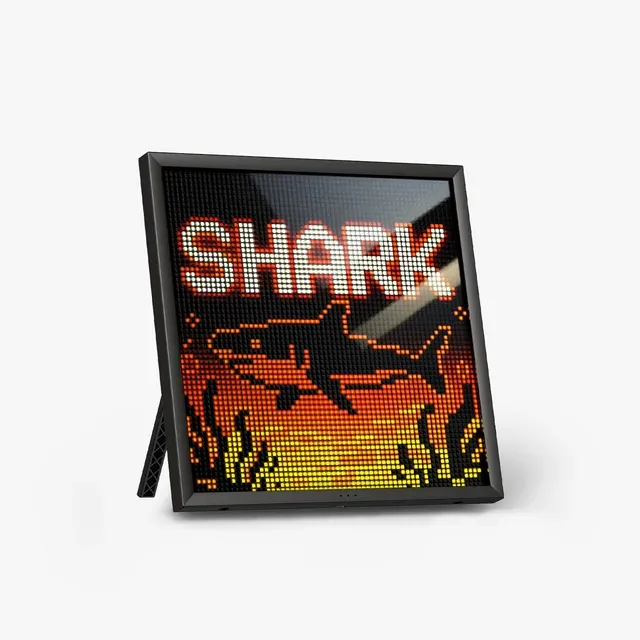
Divoom Pixoo-64 II
Buy it64x64 pixel frame with dual-band WiFi - the flagship canvas for pixel art.
- 64x64 resolution on a 10.3-inch panel - 16x the pixels of the classic 16x16 grid; faces and scenes finally readable.
- Dual-band 2.4/5GHz WiFi - Divoom says it was added for faster, more stable syncing than the 2.4GHz-only generation.
- Divoom app community shares millions of user-made designs; DIY editor built in, plus Bluetooth for quick uploads.
- Data widgets: clock, weather, stocks, calendar, social follower counts for YouTube, Twitch and Instagram - plus idle art rotation.
- Mid-range tier buys a decorative panel, not a smart display - you're paying for the aesthetic.
- WiFi setup runs through the Divoom app, so plan a pairing step.
- USB-powered with no battery - Divoom says it needs continuous power, so it lives where the cable reaches.
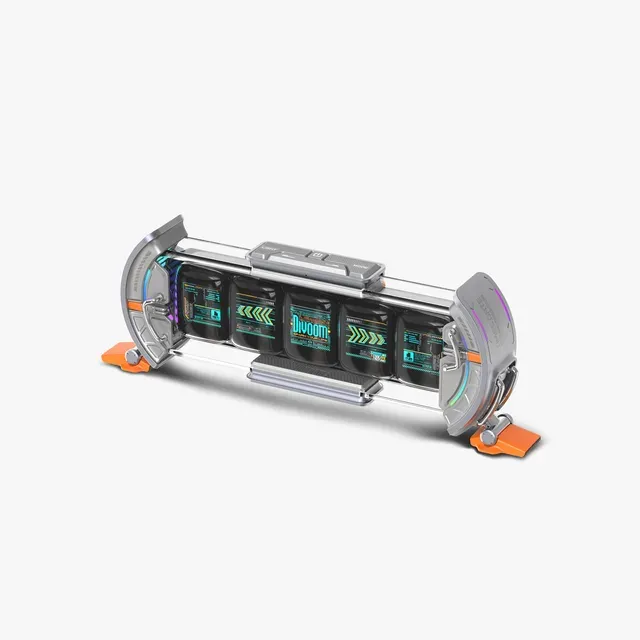
Divoom Times Gate
Buy itFive 128x128 LCDs in a retro-futurist tube - the cyberpunk info bar.
- 5 full-color 128x128 LCD screens in one 283mm chassis - each can run a different widget.
- Real info display: clock, weather, stocks, crypto, YouTube and Twitch counts across the bar.
- Dual-edge ambient lighting with 12 RGB effects - the desk-object leader here.
- Pixel animation mode bridges art and data better than a single panel.
- Mid-range money for an information bar - a niche buy even in a niche category.
- 2.4GHz WiFi only, no Bluetooth, no battery - Divoom says it needs continuous power and a WiFi network even for setup.
- Five screens = five times the fiddling to get the layout you want.
Side by side
The 5 criteria below are the ones our full comparison judged every product on, narrowed to these two.
| Divoom Pixoo-64 II Our pick | Divoom Times Gate | |
|---|---|---|
| Our verdict | Buy | Buy |
| Best for | Desk setups, streamers' shelves, and anyone who'd frame a sprite. | Setup maximalists and data-watchers who want their numbers in pixels. |
| Price tier | $$ · mid-range | $$ · mid-range |
| Screen | 64x64 LED matrix, 10.3 in | 5x 128x128 LCD screens |
| Connectivity | 2.4/5GHz WiFi + Bluetooth | 2.4GHz WiFi only |
| Power | USB, continuous | USB, continuous, no battery |
| Bonus hardware | None - pure display | 5-screen info bar + RGB edge lighting |
| Verdict | Buy - the definitive canvas | Buy - the desk-data king |
Which one is right for you?
Pick the Divoom Pixoo-64 II if
desk setups, streamers' shelves, and anyone who'd frame a sprite.
Know before buying: mid-range tier buys a decorative panel, not a smart display - you're paying for the aesthetic.
Pick the Divoom Times Gate if
setup maximalists and data-watchers who want their numbers in pixels.
Know before buying: mid-range money for an information bar - a niche buy even in a niche category.
The bottom line
Our overall pick is the Divoom Pixoo-64 II - 64x64 pixel frame with dual-band WiFi - the flagship canvas for pixel art. Choose the Divoom Times Gate instead if setup maximalists and data-watchers who want their numbers in pixels.
Want the full picture, including the other options we compared and the popular one we'd skip? Read the complete The Best Pixel Art Displays: 4 Compared (and One to Skip).