

Tech & Gadgets
The Best Pixel Art Displays: 4 Compared (and One to Skip)
Divoom owns this category - so we lined up its whole range: the 64x64 Pixoo frame, the five-screen Times Gate, the Ditoo speaker-computer, and a wearable badge that's one convention too far.
The short version
The Pixoo-64 II is the pixel display to gift: 64x64 canvas, dual-band WiFi, endless community art. The Times Gate wins for data-watchers who want five screens of info-bar cool. The Ditoo-Pro is the cute pick (speaker included, smaller canvas). Skip the Emodo badge - a wearable for conventions whose key specs Divoom doesn't publish.
Our picks at a glance
- Divoom Pixoo-64 II - Buy. 64x64 pixel frame with dual-band WiFi - the flagship canvas for pixel art.
- Divoom Times Gate - Buy. Five 128x128 LCDs in a retro-futurist tube - the cyberpunk info bar.
- Divoom Ditoo-Pro - It depends. Tiny retro-PC speaker with a pixel screen and clickable keycaps - half toy, half speaker.
- Divoom Emodo Pixel Badge - Skip. A wearable pixel screen for bags and lanyards - a convention badge, not a desk display.
The verdict in 30 seconds
What mattered most
- Price tier
- Screen
- Connectivity
- Power
- Bonus hardware
- Verdict
Pixel art displays are the rare desk gadget that earns its desk space: a tiny screen cycling custom animations, weather, clocks, or community-made art. Divoom owns the category so thoroughly that plain comparison means ranking within the brand - the question isn't which company, it's which form factor. We lined up all four shapes, from budget to mid-range tier, against what Divoom publishes for each.
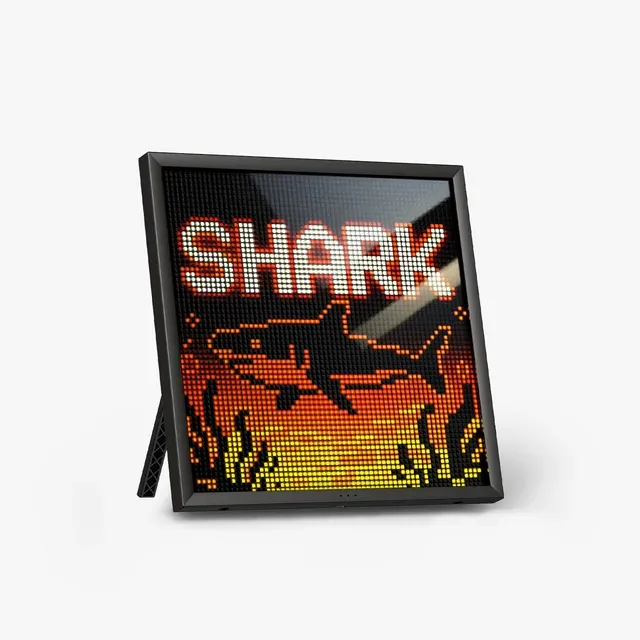
64x64 pixel frame with dual-band WiFi - the flagship canvas for pixel art.
Best for: Desk setups, streamers' shelves, and anyone who'd frame a sprite.
- 64x64 resolution on a 10.3-inch panel - 16x the pixels of the classic 16x16 grid; faces and scenes finally readable.
- Dual-band 2.4/5GHz WiFi - Divoom says it was added for faster, more stable syncing than the 2.4GHz-only generation.
- Divoom app community shares millions of user-made designs; DIY editor built in, plus Bluetooth for quick uploads.
- Data widgets: clock, weather, stocks, calendar, social follower counts for YouTube, Twitch and Instagram - plus idle art rotation.
- Mid-range tier buys a decorative panel, not a smart display - you're paying for the aesthetic.
- WiFi setup runs through the Divoom app, so plan a pairing step.
- USB-powered with no battery - Divoom says it needs continuous power, so it lives where the cable reaches.
Own the Divoom Pixoo-64 II? Tell us how it held up.
Thanks. Counted, and shown once enough owners have weighed in.
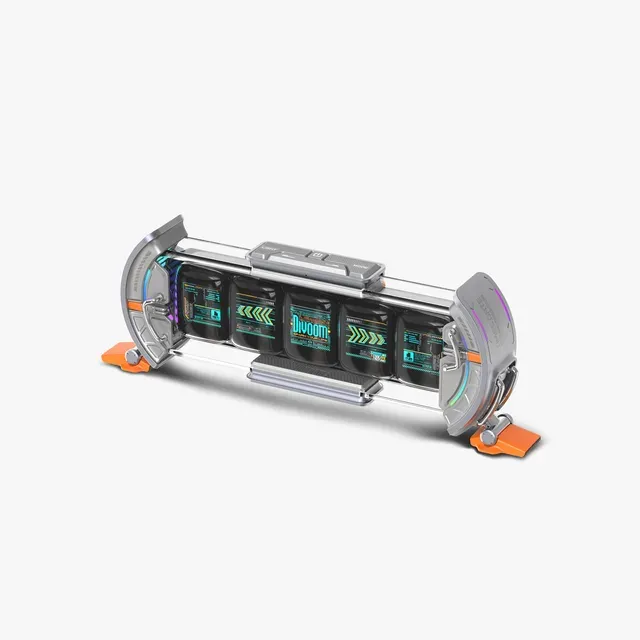
Five 128x128 LCDs in a retro-futurist tube - the cyberpunk info bar.
Best for: Setup maximalists and data-watchers who want their numbers in pixels.
- 5 full-color 128x128 LCD screens in one 283mm chassis - each can run a different widget.
- Real info display: clock, weather, stocks, crypto, YouTube and Twitch counts across the bar.
- Dual-edge ambient lighting with 12 RGB effects - the desk-object leader here.
- Pixel animation mode bridges art and data better than a single panel.
- Mid-range money for an information bar - a niche buy even in a niche category.
- 2.4GHz WiFi only, no Bluetooth, no battery - Divoom says it needs continuous power and a WiFi network even for setup.
- Five screens = five times the fiddling to get the layout you want.
Own the Divoom Times Gate? Tell us how it held up.
Thanks. Counted, and shown once enough owners have weighed in.
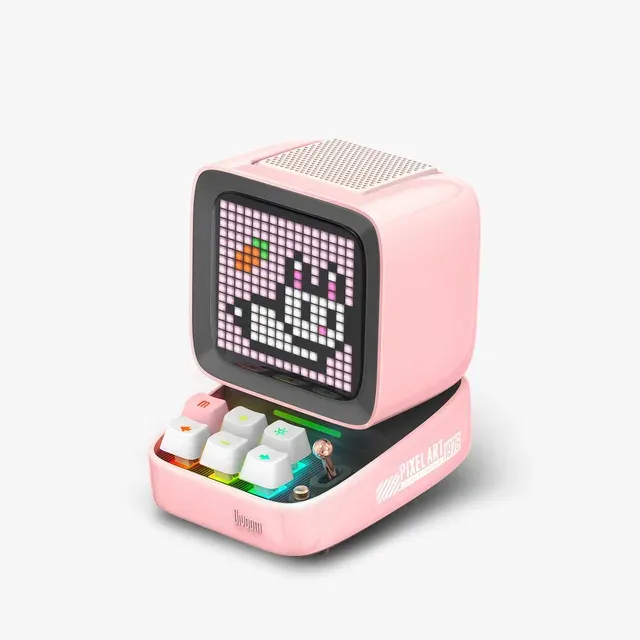
Tiny retro-PC speaker with a pixel screen and clickable keycaps - half toy, half speaker.
Best for: Kids' desks and gift-givers who want the cuteness factor, not the canvas.
- Retro-computer shell with mechanical keyboard keys and a tiny joystick - the most charming object in the lineup.
- Real Bluetooth 5.0 speaker with a 15W DSP-tuned driver, plus USB-C audio and a TF card slot - music plus visuals in one box.
- Same pixel ecosystem: animations, alarm clock, white noise, Pomodoro timer, FM radio, mini games, notifications.
- Mid-range money buys a much smaller pixel canvas than the Pixoo, and Divoom's page does not state its grid size.
- Speaker is decent, not hi-fi; the screen is the product.
Own the Divoom Ditoo-Pro? Tell us how it held up.
Thanks. Counted, and shown once enough owners have weighed in.

A wearable pixel screen for bags and lanyards - a convention badge, not a desk display.
Best for: Convention cosplayers only - and even they should look at the Ditoo.
- Clever convention and concert accessory - Divoom pitches it for anime, idol and ita-bag display, with support light effects and a lyrics scroller.
- Stores up to 6,000 photos and switches images with one tap in the app.
- Divoom publishes no screen size, resolution, battery capacity or run time for it - the specs that decide a wearable are all missing.
- A different class of product: it is merch for your bag, and it earns nothing on a desk once the event ends.
- At budget tier it costs about half a Ditoo-Pro, but the Ditoo gives you a speaker and a screen for the difference.
Own the Divoom Emodo Pixel Badge? Tell us how it held up.
Thanks. Counted, and shown once enough owners have weighed in.
| Criteria | Divoom Pixoo-64 II Top pick Buy it Buy | Divoom Times Gate Buy it Buy | Divoom Ditoo-Pro It depends Buy | Divoom Emodo Pixel Badge Skip it Buy |
|---|---|---|---|---|
| Best for | Desk setups, streamers' shelves, and anyone who'd frame a sprite. | Setup maximalists and data-watchers who want their numbers in pixels. | Kids' desks and gift-givers who want the cuteness factor, not the canvas. | Convention cosplayers only - and even they should look at the Ditoo. |
| Price tier | $$ · mid-range | $$ · mid-range | $$ · mid-range | $ · budget |
| Price tier | Mid-range | Mid-range | Mid-range | Budget |
| Screen | 64x64 LED matrix, 10.3 in | 5x 128x128 LCD screens | Small pixel screen (grid not stated by Divoom) | Not published |
| Connectivity | 2.4/5GHz WiFi + Bluetooth | 2.4GHz WiFi only | Bluetooth 5.0 | App transfer (type not published) |
| Power | USB, continuous | USB, continuous, no battery | Not published | Not published |
| Bonus hardware | None - pure display | 5-screen info bar + RGB edge lighting | 15W speaker + keys + joystick | Wearable mount, 6,000-photo storage |
| Verdict | Buy - the definitive canvas | Buy - the desk-data king | It depends - charm over pixels | Skip - wearable, not a display |
Which one is right for you?
- Desk setups, streamers' shelves, and anyone who'd frame a sprite. Buy it Divoom Pixoo-64 II
- Setup maximalists and data-watchers who want their numbers in pixels. Buy it Divoom Times Gate
- Kids' desks and gift-givers who want the cuteness factor, not the canvas. It depends Divoom Ditoo-Pro
- Convention cosplayers only - and even they should look at the Ditoo. Skip it Divoom Emodo Pixel Badge
How we judged the field
Pixel art displays are a single-brand market in practice - Divoom’s ecosystem has by far the biggest art community of the range, so the straightforward comparison is across its range. We judged screen resolution, connectivity, non-art utility (widgets, speaker), and whether the form factor earns its tier, working from Divoom’s own product pages and owner reports rather than our own bench.
Divoom Pixoo-64 II
Buy itThe Pixoo-64 II is the flagship for a reason: at 64x64 on a 10.3-inch panel, pixel art stops being a suggestion and starts being legible - faces, gradients, full scenes. The second-gen model adds dual-band 2.4/5GHz WiFi, which Divoom says was added for faster and more stable syncing than the 2.4GHz-only original, and keeps Bluetooth for quick uploads from the editor. Divoom’s app ships with a community gallery it counts in the millions of designs, so you never run out of frames, and the widget side is real: weather, stocks, calendar, and follower counters for YouTube, Twitch and Instagram that run around the clock on the WiFi link. It has 4GB of storage and stands on a desk or mounts on a wall.
The plain caveats: it is mid-range money for a decorative panel that is deliberately not a smart display, and it is USB-powered with no battery, so Divoom says it needs continuous power. It’s a lightbox for the pixel-art era - buy it for the aesthetic, not the specs.
Divoom Times Gate
Buy itThe Times Gate is the most striking object in the lineup: five 128x128 LCD screens inside a 283mm tube with dual-edge ambient lighting and 12 RGB effects, reading like a retro-future instrument cluster. Each screen can run its own widget - clock, weather, stock or crypto ticker, YouTube or Twitch count - or sync into a wide pixel animation. Divoom adds task management, countdown timers and notifications on top. It’s for the data-watcher who wants their desk to feel like a cockpit. Divoom does not publish the housing material, so treat “aluminum” claims elsewhere as unverified.
Two hard limits from Divoom’s own page: it connects over 2.4GHz WiFi only, with no Bluetooth, and it has no battery, so it needs continuous power and a network even to set up. At mid-range tier it’s an indulgence, but it’s the only one that looks like a design object from every angle.
Divoom Ditoo-Pro
It dependsThe Ditoo-Pro is the popular one: a tiny retro PC in white, pink, black, green or blue with mechanical keyboard keys, a little joystick and a pixel screen, plus a real Bluetooth 5.0 speaker with a 15W DSP-tuned driver inside. It also takes USB-C audio and a TF card, and the app adds an alarm clock, white noise, a Pomodoro timer, FM radio and mini games. At mid-range tier, speaker plus screen plus alarm clock is defensible.
But the screen is a fraction of the Pixoo’s 64x64 resolution, so art on it will read as icons rather than images. If the giftee wants the cute factor and a speaker they’ll actually use, it lands; pixel-art purists should spend up.
Divoom Emodo Pixel Badge
Skip itThe Emodo is a different class of product from everything else here: a wearable pixel screen for a bag strap or lanyard that loops your avatar, a message, support light effects or scrolling lyrics. Divoom pitches it squarely at anime, idol and concert fans and ita-bag builders, it stores up to 6,000 photos, and the app switches images with one tap. For exactly that crowd, on exactly that weekend, it does its job.
The problem is what Divoom does not publish. The product page gives no screen size, no resolution, no battery capacity and no run time - the four specs that decide whether a wearable is any good. It sits at budget tier, about half a Ditoo-Pro, but the Ditoo buys a speaker and a screen for the difference, and every desk display here keeps earning its place after the convention ends. Skip it unless the badge is the point.
Sources
Specs in this review come from these pages.
Pixoo-64 II vs Times Gate: which should you buy?
Buy the Pixoo-64 II if the giftee will browse the art feed and make their own - it’s the bigger canvas for animation and the classic form factor. Buy the Times Gate if they’re a data person: five screens of clocks, tickers, and weather is a different flex than one big canvas. Same price tier, different personality - art versus instrument panel. Both need a permanent power cable; only the Pixoo has a Bluetooth fallback.
What to look for in a pixel art display
- Resolution is the whole product. 16x16 shows icons; 64x64 shows scenes. Know which experience you’re gifting, and walk away from any listing that won’t state the pixel count.
- WiFi vs Bluetooth. WiFi units sync widgets and art unattended; Bluetooth units depend on the paired phone being nearby. Check the band: the Times Gate is 2.4GHz only.
- Power. Neither the Pixoo-64 II nor the Times Gate runs on a battery; plan the cable route before you plan the shelf.
- The app community matters more than the hardware. Divoom’s library of community animations is why these stay fresh - a no-name pixel screen without that feed is dead in a week.
- Data widgets are the long-term value. The art is the honeymoon; the weather-and-clock rotation is the marriage.
Our final take
The Pixoo-64 II is the definitive gift in this category: big canvas, dual-band WiFi, endless art. The Times Gate is the pick for the desk-pilled data-watcher. The Ditoo-Pro wins hearts with a much smaller screen. And the Emodo badge belongs at the convention it’s aimed at - and nowhere else.
Questions, answered
What can pixel art displays actually show?
Clock, weather, notifications, stock tickers, and social counts - plus the real draw: looping pixel animations from the app's community library or your own editor. Think desk accessory with information, not a second monitor.
Do they need WiFi?
WiFi models (Pixoo-64 II, Times Gate) pull live data and sync art in the background; the Times Gate will not even set up without a 2.4GHz network. Bluetooth models like the Ditoo-Pro work through a paired phone - fine for music and art, less seamless for widgets.
How hard is making your own pixel art for these?
The Divoom app includes a grid editor - draw on your phone, push to the screen. Most users mix their own pieces with downloaded community art; no skill required either way.
Is the Pixoo-64 worth it over the cheaper 16x16 models?
If the screen is the point, yes - 64x64 can render faces, scenes, and multi-color gradients that read at a glance, where 16x16 is impressionistic at best. If you want a speaker with a screen as a bonus, the Ditoo's charm wins regardless of resolution.
Deciding between the top two? See our head-to-head: Divoom Pixoo-64 II vs Divoom Times Gate.
More in Tech & Gadgets
Divoom Pixoo-64 II vs Divoom Times Gate Head-to-head →  The Best Portable Monitors of 2026: Honest Picks for Travel and Work
 The Power Banks Worth Buying (and the 'Mega-mAh' One to Skip)
 The Best Portable Power Stations: 6 Compared (and One to Skip)
 The Best Portable Projectors: 4 Compared (and One to Skip)
 The Best Portable SSDs: Fast, Rugged, and Which One to Skip