

Tech & Gadgets · Head-to-head
Epson FastFoto FF-680W vs Plustek OpticFilm 8200i SE
Which should you buy? Our verdict on both, pulled from our full The Best Photo and Film Scanners: 4 Compared (and One to Skip) comparison.
The FastFoto clears a box of prints faster than anything else here and captures notes written on the backs in the same pass. If your archive is 35mm negatives and slides, the Plustek is the better buy, because a print scanner cannot read film at all.
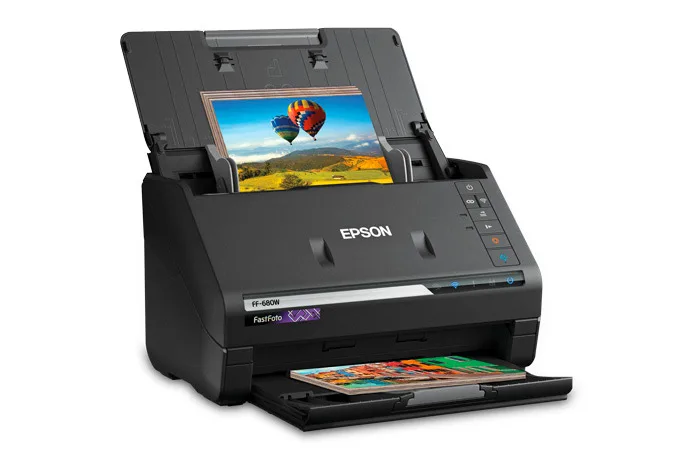
Epson FastFoto FF-680W
Buy itA sheet-fed duplex photo scanner that turns stacks of prints into files at up to one photo per second.
- Epson rates it at up to one photo per second at 300 dpi, with a feeder that holds 36 photos and handles mixed sizes in one batch.
- One-pass duplex scanning captures the picture and any handwritten notes on the back together.
- It saves 600 dpi TIFF files for archiving, connects over USB 3.0 or Wi-Fi, and includes a carrier sheet for delicate prints.
- It is built for prints, Polaroids, panoramas and documents; Epson lists no negative or slide scanning.
- Optical resolution is 600 dpi, and Epson's footnote says the 1200 dpi option is interpolated.
- Feeding old prints through rollers is a risk for curled or cracked photos, which need the carrier sheet and slow mode.
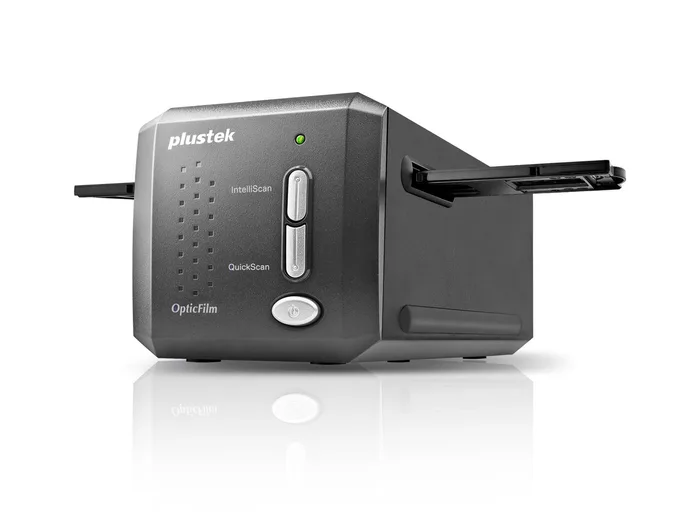
Plustek OpticFilm 8200i SE
Buy itA dedicated 35mm film and slide scanner with a 7200 dpi CCD and an infrared dust channel.
- Plustek states 7200 dpi optical resolution from a CCD sensor, with output files up to 68.9 megapixels.
- A built-in infrared channel feeds SilverFast iSRD, which finds dust and scratches on the film and removes them during the scan.
- SilverFast SE Plus is bundled, including NegaFix profiles for converting color negatives and Multi-Exposure for shadow detail.
- It scans one frame at a time from manual holders, and Plustek lists about 113 seconds per frame at 7200 dpi with multi-sampling on.
- It takes 35mm negatives and mounted slides only, so 120 medium format and prints are out.
- SilverFast has a learning curve, and Plustek's stated requirements include 8 GB of RAM and a four-core 64-bit processor.
Side by side
The 8 criteria below are the ones our full comparison judged every product on, narrowed to these two.
| Epson FastFoto FF-680W Our pick | Plustek OpticFilm 8200i SE | |
|---|---|---|
| Our verdict | Buy | Buy |
| Best for | Families with boxes of loose 4x6 and 5x7 prints who want them digitized in an afternoon rather than a month. | Anyone with a few hundred to a few thousand 35mm negatives or slides who wants real optical detail and automatic dust removal. |
| Price tier | $$$ · premium | $$ · mid-range |
| What it scans | Prints, Polaroids, panoramas, documents | 35mm negatives and mounted slides |
| Sensor | 600 dpi CIS | CCD |
| Optical resolution | 600 dpi (1200 dpi interpolated) | 7200 dpi |
| Infrared dust and scratch removal | No (auto enhance, color restoration) | Yes, iSRD |
| File formats | TIFF and JPEG | 48-bit output via SilverFast |
| Batch handling | 36-photo feeder | Manual holders, one frame at a time |
| Connection | USB 3.0 and Wi-Fi | USB 2.0 |
| Weight (maker stated) | 8.2 lb | 3.5 lb |
Which one is right for you?
Pick the Epson FastFoto FF-680W if
families with boxes of loose 4x6 and 5x7 prints who want them digitized in an afternoon rather than a month.
Know before buying: it is built for prints, Polaroids, panoramas and documents; Epson lists no negative or slide scanning.
Pick the Plustek OpticFilm 8200i SE if
anyone with a few hundred to a few thousand 35mm negatives or slides who wants real optical detail and automatic dust removal.
Know before buying: it scans one frame at a time from manual holders, and Plustek lists about 113 seconds per frame at 7200 dpi with multi-sampling on.
The bottom line
Our overall pick is the Epson FastFoto FF-680W - A sheet-fed duplex photo scanner that turns stacks of prints into files at up to one photo per second. Choose the Plustek OpticFilm 8200i SE instead if anyone with a few hundred to a few thousand 35mm negatives or slides who wants real optical detail and automatic dust removal.
Want the full picture, including the other options we compared and the popular one we'd skip? Read the complete The Best Photo and Film Scanners: 4 Compared (and One to Skip).