

Office & WFH · Head-to-head
CalDigit TS4 Thunderbolt 4 Dock vs Anker Prime Thunderbolt 5 Docking Station (14-in-1)
Which should you buy? Our verdict on both, pulled from our full The Best USB-C Docking Stations: 4 Compared (and One to Skip) comparison.
The CalDigit TS4 is still the safest one-cable desk for any Thunderbolt 3 or Thunderbolt 4 laptop, pairing the deepest port selection in the category with 98W of charging and a long record of waking up correctly. The Anker Prime Thunderbolt 5 dock takes the crown if your laptop speaks Thunderbolt 5 or needs 140W, since its 80Gbps link removes the contention that makes a Thunderbolt 4 dock feel slow under heavy display and storage load.
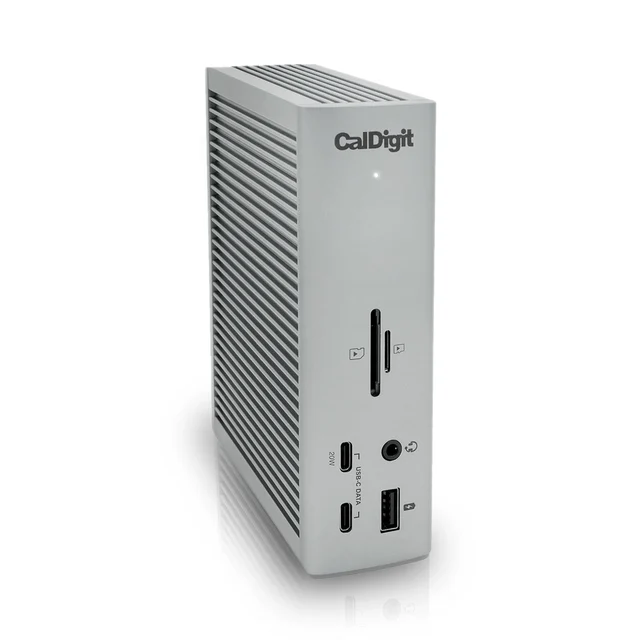
CalDigit TS4 Thunderbolt 4 Dock
Buy itThe reference Thunderbolt 4 dock: eighteen genuinely useful ports, 98W to the host, and a reputation for waking up correctly every morning.
- Eighteen ports including three Thunderbolt 4, UHS-II SD and microSD, and 2.5 Gigabit Ethernet
- 98W host charging covers most 14 inch laptops
- Owners and reviewers both single out reliable sleep and wake behaviour, where cheap docks fail
- Owners report it stays cool and quiet under a full port load
- Thunderbolt 4 rather than Thunderbolt 5, so displays and a fast SSD still share 40Gbps
- Costs more than most laptops' own chargers, and it is a premium buy in this category
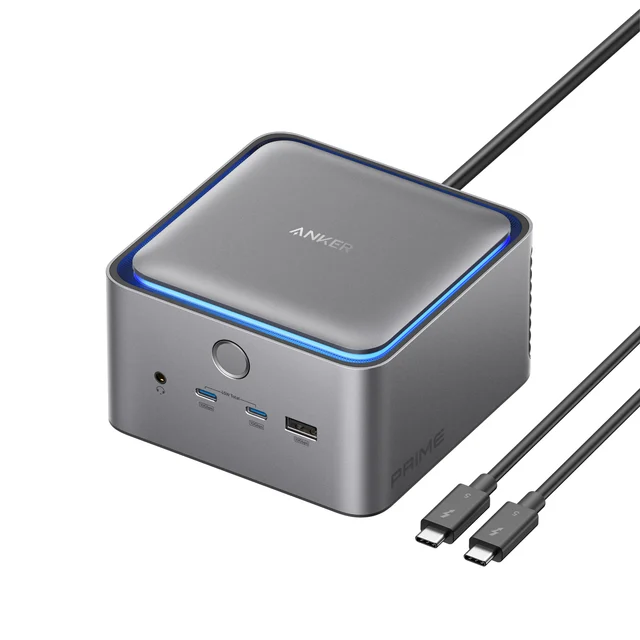
Anker Prime Thunderbolt 5 Docking Station (14-in-1)
Buy it80Gbps upstream and 140W back to the laptop, which is what a 16 inch machine actually needs to charge at full speed while you work.
- 140W host charging, the only dock here that fully feeds a 16 inch MacBook Pro
- Thunderbolt 5 at 80Gbps symmetric with a 120Gbps boost mode, so monitors and a fast SSD stop competing
- Fourteen well chosen ports including two downstream Thunderbolt 5 and 2.5 Gigabit Ethernet
- Built-in active cooling and interactive ambient lighting
- HDMI 2.1 and DisplayPort 2.1 cannot be used simultaneously, and it runs two external displays on nearly every laptop (Anker lists triple display as working on very few machines)
- Most of the bandwidth premium is wasted on a Thunderbolt 4 laptop
- SD and microSD readers are UHS-I only, slower than the TS4's UHS-II readers
Side by side
The 7 criteria below are the ones our full comparison judged every product on, narrowed to these two.
| CalDigit TS4 Thunderbolt 4 Dock Our pick | Anker Prime Thunderbolt 5 Docking Station (14-in-1) | |
|---|---|---|
| Our verdict | Buy | Buy |
| Best for | Anyone with a Thunderbolt 3 or Thunderbolt 4 laptop who wants one cable to run a permanent two-monitor desk. | Thunderbolt 5 or USB4 v2 laptops, large notebooks that need 140W, and anyone moving big files while two monitors are lit. |
| Price tier | $$$ · premium | $$$$ · flagship |
| Upstream link | Thunderbolt 4, 40Gbps | Thunderbolt 5, 80Gbps symmetric (120Gbps boost) |
| Host charging | 98W | 140W (USB PD 3.1) |
| Displays on Windows | Dual 4K 60Hz, or single 8K | Dual on nearly all laptops (HDMI 2.1 or DP 2.1, not both) |
| Displays on Apple Silicon | Dual 6K 60Hz on M1 Pro, M1 Max or M1 Ultra, otherwise dual 4K 60Hz | Whatever your chip allows, up to two |
| Driver required | No | No |
| Ethernet | 2.5 Gigabit | 2.5 Gigabit |
| Port count | 18 | 14 |
Which one is right for you?
Pick the CalDigit TS4 Thunderbolt 4 Dock if
anyone with a Thunderbolt 3 or Thunderbolt 4 laptop who wants one cable to run a permanent two-monitor desk.
Know before buying: thunderbolt 4 rather than Thunderbolt 5, so displays and a fast SSD still share 40Gbps.
Pick the Anker Prime Thunderbolt 5 Docking Station (14-in-1) if
thunderbolt 5 or USB4 v2 laptops, large notebooks that need 140W, and anyone moving big files while two monitors are lit.
Know before buying: hDMI 2.1 and DisplayPort 2.1 cannot be used simultaneously, and it runs two external displays on nearly every laptop (Anker lists triple display as working on very few machines).
The bottom line
Our overall pick is the CalDigit TS4 Thunderbolt 4 Dock - The reference Thunderbolt 4 dock: eighteen genuinely useful ports, 98W to the host, and a reputation for waking up correctly every morning. Choose the Anker Prime Thunderbolt 5 Docking Station (14-in-1) instead if thunderbolt 5 or USB4 v2 laptops, large notebooks that need 140W, and anyone moving big files while two monitors are lit.
Want the full picture, including the other options we compared and the popular one we'd skip? Read the complete The Best USB-C Docking Stations: 4 Compared (and One to Skip).