

Home & Kitchen
The Best Craft Cutting Machines: 4 Compared (and One to Skip)
From Silhouette's Cameo 5 Alpha to Brother's scanner-equipped ScanNCut - the machines that turn vinyl and cardstock into actual projects, and the 25-inch production cutter no gift recipient needs.
The short version
Buy the Silhouette Cameo 5 Alpha for the crafter who wants capability without subscriptions. Buy the Brother ScanNCut SDX125e, at a flagship price, for the hands-on maker who'd rather scan a drawing than learn software. xTool's M2 is a different sport (laser plus optional inkjet) for serious makers. Skip Siser's Romeo for a gift - a 25-inch production cutter is shop equipment, not a craft machine.
Our picks at a glance
- Silhouette Cameo 5 Alpha - Buy. 12-inch smart cutter with serious software - the Cricut alternative that respects your files.
- Brother ScanNCut SDX125e - Buy. A cutter with a built-in scanner - draw it, scan it, cut it, no computer required.
- xTool M2 Color Craft Laser - It depends. A 10W or 20W enclosed diode laser with an optional CMYK inkjet module - the crossover for makers past vinyl.
- Siser Romeo 24-inch Vinyl Cutter - Skip. A 25-inch-wide production cutter from a heat-transfer vinyl company - shop equipment, not a craft gift.
The verdict in 30 seconds
What mattered most
- Price tier
- Max cutting width
- Signature feature
- Materials
- Verdict
A craft cutting machine is the gift that turns 'I should make that' into 'I made that' - vinyl decals, heat-transfer shirts, cardstock, stickers. The market is Cricut's world, but the lineup worth knowing includes Silhouette's more open alternative, Brother's scanner-equipped hybrid, and xTool's laser crossover. One warning: the jump from 'craft' to 'pro' is where good gifts go wrong.
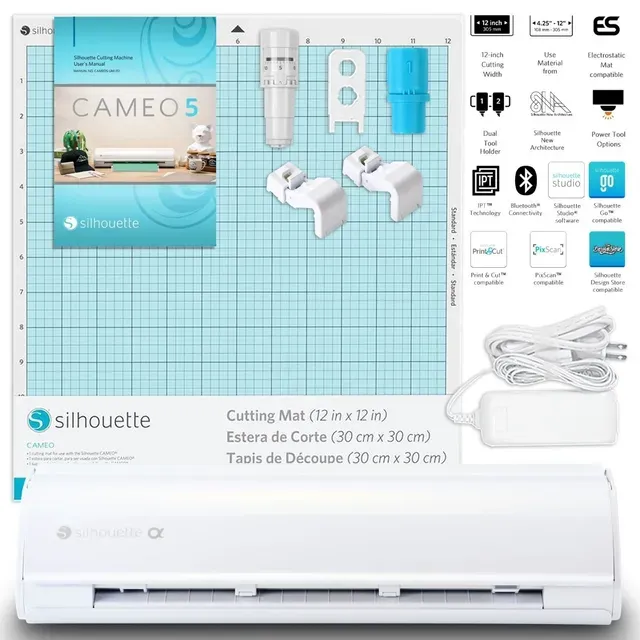
12-inch smart cutter with serious software - the Cricut alternative that respects your files.
Best for: Crafters who want control - file freedom, material freedom, no subscription pressure.
- 12 x 24 in cutting area on the mat, 11.6 in x 16 ft on lined material, and up to 3 mm thick - vinyl, HTV, cardstock, fabric and specialty media.
- Intelligent Path Technology, two tool slots and automatic blade adjustment - the machine sorts depth so beginners do not have to.
- Silhouette Studio Basic Edition is free with one-time upgrade options, no subscription required.
- In the box: AutoBlade, 12-inch standard-tack mat, sketch pen adapter, Bluetooth and USB connectivity, 100 designs on registration.
- Premium price before mats, blades and vinyl, which add up in the first month.
- Opening SVG files requires the paid Designer Edition upgrade; the free Basic Edition cuts Silhouette's own formats.
- Studio's depth means a steeper first-weekend curve than Cricut's hand-holding.
Own the Silhouette Cameo 5 Alpha? Tell us how it held up.
Thanks. Counted, and shown once enough owners have weighed in.
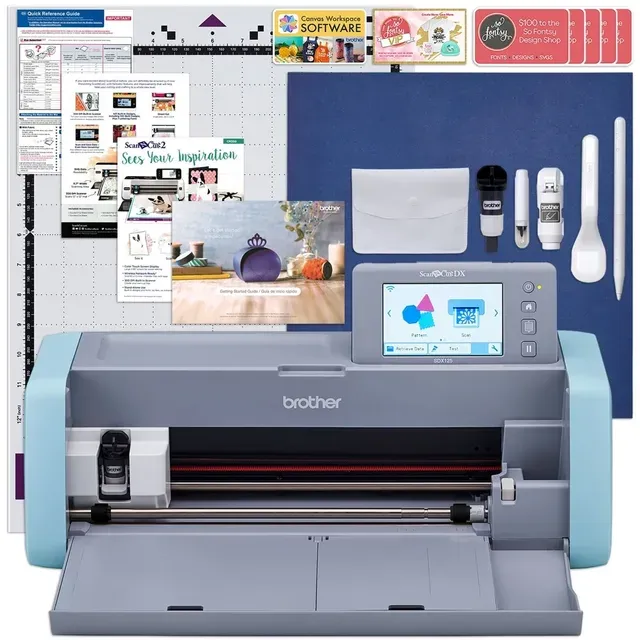
A cutter with a built-in scanner - draw it, scan it, cut it, no computer required.
Best for: Quilters, card-makers, and the computer-averse - scan-to-cut is the killer feature.
- Built-in 600 dpi scanner with on-screen editing: photograph a drawing or printed shape and cut it directly.
- Standalone 5-inch LCD touchscreen with 682 built-in designs, 100 quilt patterns and 9 fonts - usable without a laptop or phone.
- Blade Sensor Technology: the Auto Blade reads material thickness itself and cuts foam, felt and fabric up to 3 mm.
- Wireless network ready; CanvasWorkspace runs on PC, tablet or phone and accepts FCM and SVG files.
- Flagship price - the most expensive hobbyist cutter here, and the USB cable is not included.
- CanvasWorkspace software is functional but dated next to Silhouette Studio.
Own the Brother ScanNCut SDX125e? Tell us how it held up.
Thanks. Counted, and shown once enough owners have weighed in.
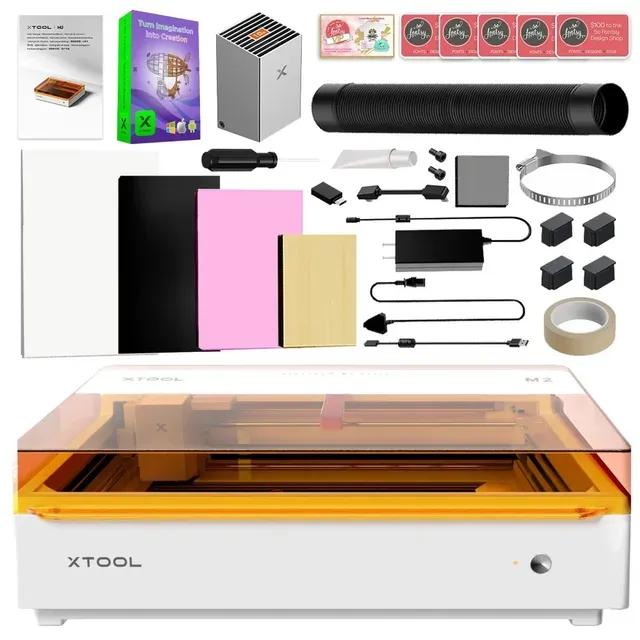
A 10W or 20W enclosed diode laser with an optional CMYK inkjet module - the crossover for makers past vinyl.
Best for: Etsy-seller aspirants and makers who've outgrown vinyl - not a starter machine.
- Cuts and engraves wood, acrylic, leather and more that a blade cutter cannot touch; the inkjet module adds full-color print-then-cut on paper, fabric and boards.
- Enclosed Class 1 laser with dual cameras for live preview and positioning - xTool says it is safe with pets and kids around.
- One machine replaces a cutter, an engraver and a sticker printer for a craft business.
- Flagship price for the 10W standalone, more for 20W, and the CMYK inkjet module only comes in the Color Print & Cut and Deluxe bundles.
- It's a laser: xTool recommends its separate air purifier for regular use, warns against PVC and unknown foams, and the inkjet cannot print on metal, glass or ceramic.
- Footprint and workflow are workshop, not kitchen table.
Own the xTool M2 Color Craft Laser? Tell us how it held up.
Thanks. Counted, and shown once enough owners have weighed in.
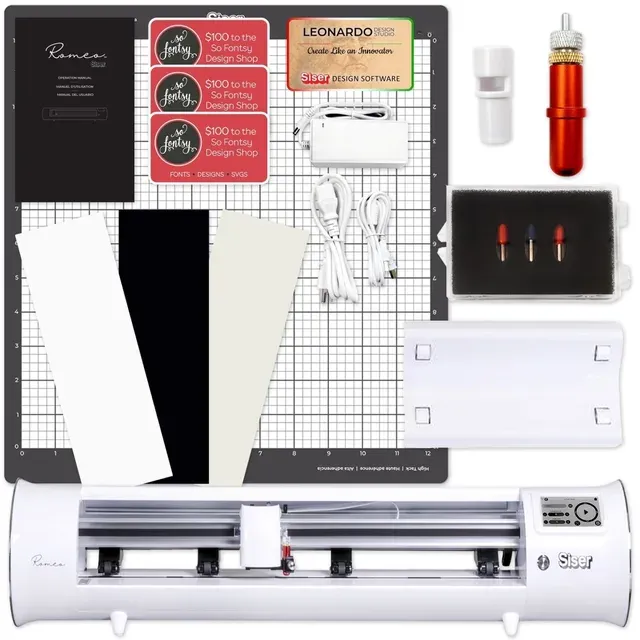
A 25-inch-wide production cutter from a heat-transfer vinyl company - shop equipment, not a craft gift.
Best for: Side-hustle shops already selling decals and shirts - nobody's first cutter.
- 25 in maximum material width and 5-yard cuts with the roll holder - real shop capacity, per Siser.
- Wi-Fi and USB connectivity, Leonardo Design Studio software, and 45-degree, 60-degree and deep-cut blades plus etch and crease tools.
- Materials Siser lists include HTV, decal vinyl, cardstock, paper and felt.
- This is a different class of machine - a 25-inch production cutter sized for a sign or apparel shop, not a desk.
- Flagship price, and the gift recipient who wants to make birthday cards does not need 5-yard roll handling.
- Leonardo Design Studio is Siser's own ecosystem; the hobby cutters here have far larger design libraries and communities.
Own the Siser Romeo 24-inch Vinyl Cutter? Tell us how it held up.
Thanks. Counted, and shown once enough owners have weighed in.
| Criteria | Silhouette Cameo 5 Alpha Top pick Buy it Buy | Brother ScanNCut SDX125e Buy it Buy | xTool M2 Color Craft Laser It depends Buy | Siser Romeo 24-inch Vinyl Cutter Skip it Buy |
|---|---|---|---|---|
| Best for | Crafters who want control - file freedom, material freedom, no subscription pressure. | Quilters, card-makers, and the computer-averse - scan-to-cut is the killer feature. | Etsy-seller aspirants and makers who've outgrown vinyl - not a starter machine. | Side-hustle shops already selling decals and shirts - nobody's first cutter. |
| Price tier | $$$ · premium | $$$$ · flagship | $$$$ · flagship | $$$$ · flagship |
| Price tier | $$$ · premium | $$$$ · flagship | $$$$ · flagship | $$$$ · flagship |
| Max cutting width | 12 in (24 in long on mat, 16 ft lined) | 11.7 in scan width, 3 mm thick | Enclosed laser bed (not roll-fed) | 25 in material width, 5 yd rolls |
| Signature feature | Auto blade adjustment + free Studio Basic | Built-in 600 dpi scanner, no PC needed | Laser + optional CMYK inkjet hybrid | Production-width roll cutter |
| Materials | Vinyl, HTV, cardstock, fabric | Vinyl, fabric, cardstock, foam, felt | Wood, acrylic, leather + print | HTV, vinyl, cardstock, paper, felt |
| Verdict | Buy - best hobbyist balance | Buy - the scanner is the feature | It depends - laser crossover | Skip - pro width, different class |
Which one is right for you?
- Crafters who want control - file freedom, material freedom, no subscription pressure. Buy it Silhouette Cameo 5 Alpha
- Quilters, card-makers, and the computer-averse - scan-to-cut is the killer feature. Buy it Brother ScanNCut SDX125e
- Etsy-seller aspirants and makers who've outgrown vinyl - not a starter machine. It depends xTool M2 Color Craft Laser
- Side-hustle shops already selling decals and shirts - nobody's first cutter. Skip it Siser Romeo 24-inch Vinyl Cutter
How we judged the field
We judged on four axes: what it cuts, how the software treats you (free versus gated), whether a gift recipient can use it in hour one, and whether the machine’s ambitions match a hobby budget. The cutter market is where ‘pro’ features become beginner burdens fastest. Every spec below is from the maker’s own product page; where a maker does not publish a figure, we say so.
Silhouette Cameo 5 Alpha
Buy itThe Cameo 5 Alpha is the pick for most giftees. Silhouette publishes a 12 x 24 inch guaranteed operating area on the cutting mat, 11.6 inches by 16 feet on lined material, a 3 mm maximum material thickness, two tool slots, automatic blade adjustment, and both USB and Bluetooth connectivity. The box holds the machine, AC adapter, a 12-inch standard-tack mat, an AutoBlade, a sketch pen adapter, a download of Silhouette Studio, 100 designs on registration and a one-month Design Store trial. The unit is 22.3 inches wide and weighs 11.5 lb. Intelligent Path Technology plans the cut order for cleaner results on layered designs, and the electrostatic mat that grips delicate material without adhesive is sold separately.
The software story needs one correction from the way it is often told. Silhouette Studio Basic Edition is free, and upgrades are one-time purchases rather than subscriptions; that part is true and is the reason to choose Silhouette. But Silhouette’s own FAQ says opening SVG files requires the Designer Edition or above, and saving SVGs requires the Business Edition. A crafter who lives on downloaded SVGs should budget for the Designer upgrade on day one. Even so, a one-time upgrade is a different world from a monthly fee for designs you already own.
Brother ScanNCut SDX125e
Buy itThe ScanNCut’s party trick is a standout: a 600 dpi scanner built into the lid, with on-screen editing on the 5-inch LCD touchscreen. Draw a shape on paper, scan it, and the machine cuts it - no laptop, no software, no file formats. Brother’s Blade Sensor Technology means the Auto Blade reads material thickness itself, with no blade adjustment or material selection, and it cuts foam, felt and fabric up to 3 mm. The machine carries 682 built-in designs including 100 quilt patterns and 9 fonts, is wireless network ready, and accepts FCM and SVG files through the CanvasWorkspace app on PC, tablet or phone. It weighs 12.79 lb, the USB cable is not included, and Brother warrants it for one year on parts and labor and two years on electronics.
The flagship price is the tax for that independence, and CanvasWorkspace remains the weak link next to Silhouette Studio. But for quilters, paper crafters and anyone who would rather draw than click, scan-to-cut is the feature that makes the hobby click.
xTool M2 Color Craft Laser
It dependsThe M2 isn’t really competing with the other three. xTool sells it as a 10W or 20W enclosed blue diode laser with dual cameras for live preview and positioning, an optional 3W infrared module for metal and plastic engraving, and a CMYK inkjet module that prints full color on paper, fabric and boards before the laser cuts them. The maker lists paper, fabric, wood, leather, acrylic and metal as workable depending on module, and rates the enclosure Class 1. Two details matter for a gift buyer: the inkjet module ships only in the Color Print & Cut and Deluxe bundles, not with the standalone laser, and xTool recommends its separate desktop air purifier for regular use, with a stronger unit for frequent cutting or smelly materials. It also warns never to laser PVC, polycarbonate, or leather and foam of unknown composition.
For a maker who has already outgrown vinyl, it’s the all-in-one upgrade. For a first-timer, it’s a flagship-priced workshop commitment with fume handling and material rules to learn - more project than present unless you know the recipient wants exactly this.
Siser Romeo 24-inch Vinyl Cutter
Skip itThe Romeo is a different class of machine, and we say so plainly: Siser, a heat-transfer vinyl company, sells it through Siser North America as shop equipment. The published specs are a 25-inch maximum material width, 5-yard cut length with the roll holder, Wi-Fi and USB connectivity, Leonardo Design Studio software, and a tool set of 45-degree, 60-degree and deep-cut blades plus etch and crease tools. Siser lists HTV, decal vinyl, cardstock, paper and felt as compatible materials.
Our skip is about fit, not quality. A 25-inch cutter at a flagship price is sized for a sign or apparel shop; the hobbyist who wants to make stickers gets a machine built around 5-yard rolls. Leonardo is Siser’s own software with a far smaller design library and community than Silhouette Studio or CanvasWorkspace. For the person who will use a cutter weekly for fun, the 12-inch machines do everything they need in a quarter of the desk space.
Sources
Specs in this review come from these pages.
- Silhouette America: Cameo 5 Alpha product page (silhouetteamerica.com)
- Silhouette America: Silhouette Studio editions and SVG FAQ (silhouetteamerica.com)
- Brother USA: ScanNCut SDX125E product page (brother-usa.com)
- xTool: M2 Color Craft Laser Cutter & Engraver product page (xtool.com)
- Siser North America: Romeo 24-inch Cutter product page (siserna.com)
Silhouette Cameo vs Brother ScanNCut: which should you buy?
If the recipient lives on a laptop - files, fonts, downloaded designs - the Cameo 5 Alpha gives more cutting area for less money, with the one caveat that SVG import needs the Designer Edition upgrade. If they’re the draw-it-and-touch-it type (quilters, paper crafters, grandparents), the ScanNCut’s scanner-and-touchscreen independence is worth the premium. The xTool M2 is a separate question entirely, and the Romeo is nobody’s first cutter.
What to look for in a craft cutting machine
- Software first, hardware second. The blade is commodity; the design environment decides whether the machine gets used. Check which file formats the free tier opens.
- Width is not a flex. 12 inches covers most hobby projects; 24- and 25-inch machines are for production rolls and shops.
- Automatic blade adjustment saves weekends. Machines that sense the material or set their own blade depth remove the most common beginner failure.
- Scanning changes the game. ScanNCut’s lid scanner is the single feature that makes a cutting machine usable for non-software people.
- Lasers are a different purchase. Budget for fume extraction and read the maker’s material warnings before the machine, not after.
Our final take
The Cameo 5 Alpha is the best gift for most crafters - free software with one-time upgrades, smart blades, a premium but not flagship price. The ScanNCut SDX125e is the answer for the hands-on maker who’d never touch design software. The xTool M2 is a laser workshop in one box for makers ready to level up. And the Romeo is shop equipment - admire it, don’t wrap it.
Questions, answered
Cricut vs Silhouette - which is better?
Cricut's Design Space is often described as friendlier for beginners. Silhouette Studio Basic Edition is free, with one-time paid upgrades (Designer Edition unlocks SVG import) instead of a monthly fee - and Cameo machines adjust their own blades. For a gift, Cricut's ecosystem is simpler; for a maker, Silhouette's freedom wins.
What can you actually make with a cutting machine?
Vinyl decals for mugs and cars, heat-transfer shirts and tote bags, cardstock party decor, stickers, stencils, fabric appliques, and leather goods on the stronger machines.
Do I need a computer?
The ScanNCut works fully standalone via its touchscreen and scanner. Cameo and most others need a laptop or tablet for design work, though they cut over Bluetooth once set up.
What about laser cutters vs blade cutters?
Different categories: blade cutters (Cameo, ScanNCut) handle vinyl, paper and fabric cheaply and safely on a kitchen table. Lasers (xTool M2) cut wood and acrylic but need fume handling, fire awareness, and a workshop mindset.
Deciding between the top two? See our head-to-head: Silhouette Cameo 5 Alpha vs Brother ScanNCut SDX125e.
More in Home & Kitchen
Silhouette Cameo 5 Alpha vs Brother ScanNCut SDX125e Head-to-head →  The Best Crepe Makers: 6 Compared (and One to Skip)
 The Best Cutting Boards: 4 Compared (and One to Skip)
 The Best Home Deep Fryers: 4 Compared (and One to Skip)
 The Best Dehumidifiers of 2026: 3 Worth Buying and 1 to Skip
 The Best Everyday Dinnerware Sets: 4 Compared (and One to Skip)