

Tech & Gadgets
The Best Coding Robots: 4 Compared (and One to Skip)
We compared the Sphero BOLT, Learning Resources' Botley 2.0, the Sphero Mini and a dart-blasting "programmable" robot on real coding depth, screen requirements and lasting interest.
The short version
The Sphero BOLT is the coding robot to buy for kids ready for real code: sensors, an LED matrix and a ladder from Draw to JavaScript or Python. Botley 2.0 is the screen-free pick for young kids. The Sphero Mini is the budget it-depends entry for kids with a device. Skip the YCOO Robo Blast - 20 steps of direction recording is an RC toy, not coding.
Our picks at a glance
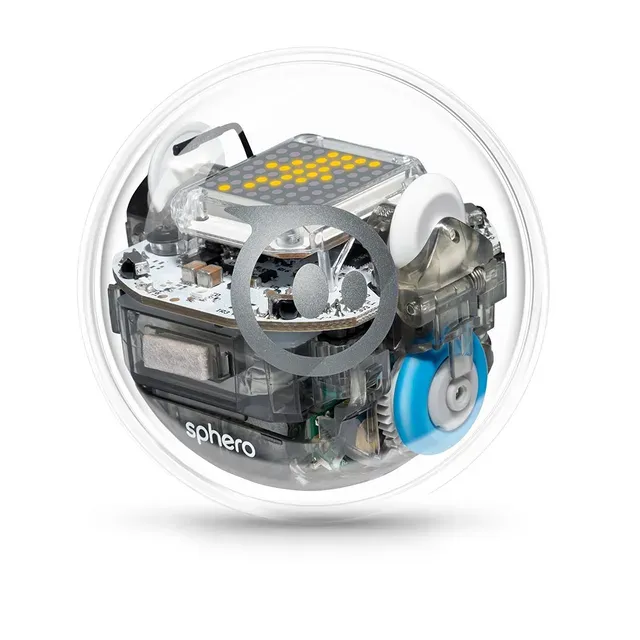
- Sphero BOLT - Buy. The real coding robot: a programmable 8x8 LED matrix, a compass and infrared, and a path from Draw to Blocks to JavaScript or Python.
- Learning Resources Botley 2.0 Coding Robot Activity Set - Buy. Screen-free coding for young kids: program step sequences by remote, no tablet or phone needed.
- Sphero Mini - It depends. A ping-pong-ball-sized app robot with real sensors and three coding modes - Sphero tech, if you have a device.
- YCOO Robo Blast - Skip. A 34cm dart-blasting remote-control robot that records 20 movement steps - a different class of toy from the coding robots above.
The verdict in 30 seconds
What mattered most
- Coding type
- Screen needed
- Coding depth
- Sensors / outputs
- Age range
- Price tier
A coding robot is the gift that teaches programming without feeling like homework - if it actually teaches coding. Half the "coding robots" on the shelf are remote-control toys that record 20 direction steps and call it programming. We compared two real coding platforms, an app-controlled entry point, and a blaster toy wearing a programmer's hat, working from what each maker publishes.
The real coding robot: a programmable 8x8 LED matrix, a compass and infrared, and a path from Draw to Blocks to JavaScript or Python.
Best for: Kids ready to write actual code - the gift that scales from driving to JavaScript and Python.
- Real programming: drive it, then program it three ways in the free Sphero Edu app - Draw, Blocks, and text code in JavaScript or Python - a real skill ladder.
- An 8x8 programmable LED matrix plus a magnetometer (compass), infrared communication between robots and the motion sensors Sphero calls live sensors - the hardware that makes programs feel physical.
- Waterproof shell built for classroom use with what Sphero calls all-day battery life; it survives the living room easily.
- Grows from remote-control driving to real code - the same device a young child drives is the one an older one programs.
- Inductive charging base, USB cable, a 360-degree protractor mat and a quick-start guide are in the box.
- Premium money - a serious gift, not a stocking stuffer.
- It needs a phone, tablet or Chromebook - a screen-dependent robot, which defeats the "screen-free coding" goal some parents want.
- Sphero now sells a newer BOLT+ and flags it on the BOLT page - the original is still listed, but it is the outgoing model.
- Sphero publishes no age on the product page, only grade tags from elementary through high school.
Own the Sphero BOLT? Tell us how it held up.
Thanks. Counted, and shown once enough owners have weighed in.
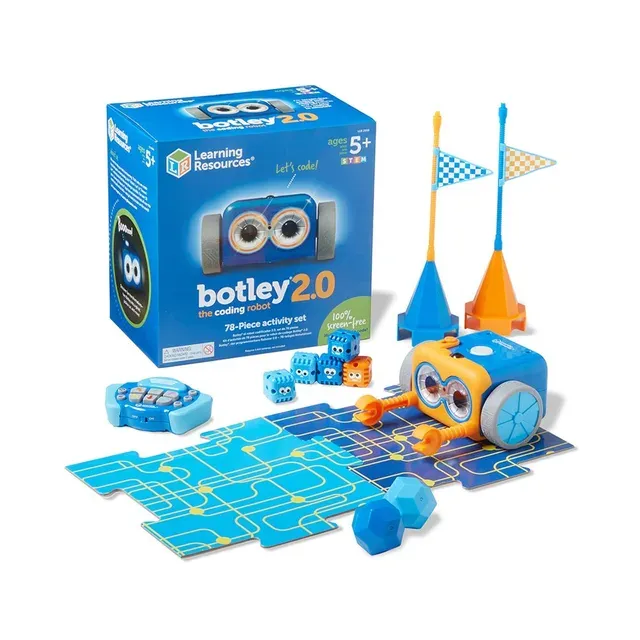
Screen-free coding for young kids: program step sequences by remote, no tablet or phone needed.
Best for: Young kids whose parents want screen-free coding - the rare robot that teaches real sequencing with zero app.
- Truly screen-free - a remote programmer keys in sequences so kids code without a tablet or app.
- Step sequences keyed in by remote, plus code-by-color, lights and sounds - real sequencing logic for young kids.
- Activity set with obstacle-course pieces and a "Botley Says" memory game.
- A complete kit in the mid-range tier - the youngest real coding experience here by years.
- The remote is how you code - lose it and the robot is a very cute paperweight.
- Runs on batteries, so budget for a set.
- Aimed at young kids - older kids want the text-based coding the Sphero offers.
- It teaches sequences and logic, not loops or conditionals the way real code does.
Own the Learning Resources Botley 2.0 Coding Robot Activity Set? Tell us how it held up.
Thanks. Counted, and shown once enough owners have weighed in.
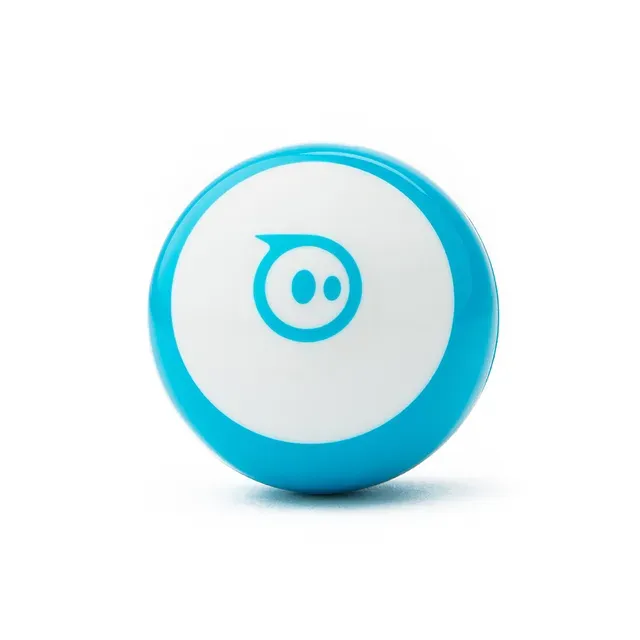
A ping-pong-ball-sized app robot with real sensors and three coding modes - Sphero tech, if you have a device.
Best for: A first taste of coding for a kid with a tablet - test the interest in the budget tier before committing to BOLT.
- Gyroscope, accelerometer, motor encoders and LED lights in a ball the size of a ping-pong ball - real Sphero hardware.
- Three programming canvases in Sphero Edu - Draw, Blocks and JavaScript - plus the Sphero Play app for games and block driving.
- Interchangeable shells in blue, green and red, and three mini traffic cones and six bowling pins in the box.
- The cheapest way into real robot programming - a tester gift before the premium BOLT.
- Completely device-dependent - no phone or tablet, no robot. Zero screen-free play.
- 45 minutes of play per charge, per Sphero - short sessions.
- Smaller and simpler than BOLT - no LED matrix, no compass or infrared, and Python is not listed.
- Sphero advises adult supervision under 8: the shell opens and the small parts inside are a choking hazard.
Own the Sphero Mini? Tell us how it held up.
Thanks. Counted, and shown once enough owners have weighed in.
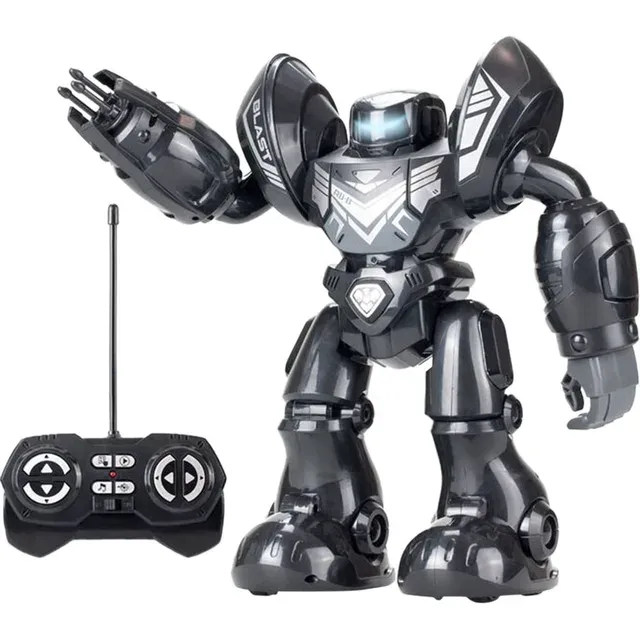
A 34cm dart-blasting remote-control robot that records 20 movement steps - a different class of toy from the coding robots above.
Best for: A kid who wants a remote-control blaster robot. It is not a coding robot, and shouldn't be bought as one - buy the Botley or Mini for the same money if coding is the goal.
- Blasts foam darts in single or continuous mode (3 per reload, 6 included), dances, and has LED eyes and sound effects - kids will enjoy it.
- Records up to 20 programming steps - walk in different directions and blast on command - a taster of programmed sequences.
- Tall, dramatic and giftable-looking, from Silverlit's YCOO robot line.
- "20 programming steps" is recording directions, not coding - no loops, no conditionals, no sensor input, no path to code.
- Mid-range money for an RC dart toy; the same tier buys a Botley that teaches real sequencing.
- It's a blaster first and a robot second - Silverlit's own page leads with the remote, the darts and dance mode.
- We did not find a battery spec on Silverlit's product page.
Own the YCOO Robo Blast? Tell us how it held up.
Thanks. Counted, and shown once enough owners have weighed in.
| Criteria | Sphero BOLT Top pick Buy it Buy | Botley 2.0 Coding Robot Activity Set Buy it Buy | Sphero Mini It depends Buy | YCOO Robo Blast Skip it Buy |
|---|---|---|---|---|
| Best for | Kids ready to write actual code - the gift that scales from driving to JavaScript and Python. | Young kids whose parents want screen-free coding - the rare robot that teaches real sequencing with zero app. | A first taste of coding for a kid with a tablet - test the interest in the budget tier before committing to BOLT. | A kid who wants a remote-control blaster robot. It is not a coding robot, and shouldn't be bought as one - buy the Botley or Mini for the same money if coding is the goal. |
| Price tier | $$$ · premium | $$ · mid-range | $ · budget | $$ · mid-range |
| Coding type | Draw, Blocks, JavaScript or Python | Screen-free remote sequences | Draw, Blocks, JavaScript | 20-step record, not coding |
| Screen needed | Yes, phone/tablet | No - fully screen-free | Yes, phone/tablet | No (RC remote) |
| Coding depth | Loops, sensors, real code | Long remote sequences | Same ladder as BOLT, Python not listed | Direction recording only |
| Sensors / outputs | 8x8 matrix, compass, IR, motion | Dark sensor, lights, sounds | Gyro, accel, LED | Darts, LED eyes, sounds |
| Age range | Not published (grades elementary to high school) | Young kids (maker page not checked) | Not published; supervise under 8 | Not published |
| Price tier | Premium | Mid-range | Budget | Mid-range |
| Teaches real code | Yes | Sequencing logic | Yes | No |
Which one is right for you?
- Kids ready to write actual code - the gift that scales from driving to JavaScript and Python. Buy it Sphero BOLT
- Young kids whose parents want screen-free coding - the rare robot that teaches real sequencing with zero app. Buy it Learning Resources Botley 2.0 Coding Robot Activity Set
- A first taste of coding for a kid with a tablet - test the interest in the budget tier before committing to BOLT. It depends Sphero Mini
- A kid who wants a remote-control blaster robot. It is not a coding robot, and shouldn't be bought as one - buy the Botley or Mini for the same money if coding is the goal. Skip it YCOO Robo Blast
How we judged the field
A coding robot earns the name by teaching programming - sequences, loops, conditionals, sensor input. Half the category is remote-control toys that record a few direction steps and get called “coding robots” on the box. We compared a real programming platform, a screen-free sequencer, an app-controlled entry point and a dart toy wearing a coder’s hat, on the coding depth each maker actually publishes and whether the gift lasts past the first week.
Sphero BOLT
Buy itThe BOLT is the real coding platform: a ball you drive first, then program three ways through the free Sphero Edu app - Draw, Blocks, and text code in JavaScript or Python. The hardware justifies the software - an 8x8 programmable LED matrix, a magnetometer that works as a compass, infrared communication so two BOLTs can talk to each other, and the motion sensors Sphero calls live sensors - so a program produces something physical: a rolling, lighting, sensing machine. The box includes an inductive charging base with USB cable, a 360-degree protractor mat and a quick-start guide; Sphero Edu runs on iOS, Android and Chrome.
It’s the premium pick, and it earns it: the same device a young child pilots in drive mode is the one an older one writes JavaScript for. The waterproof shell is built for classroom use, with what Sphero calls all-day battery life. Two caveats are plain. It needs a phone, tablet or Chromebook, so it’s not the screen-free answer. And Sphero now flags a newer BOLT+ on the BOLT page, so the original is the outgoing model - still listed and still the better-documented of the two, but not the newest. Sphero publishes no age on the page, only grade tags from elementary through high school. For a kid ready to write actual code, this is the robot.
Botley 2.0 Coding Robot Activity Set
Buy itBotley 2.0 does what no other robot here does: teaches coding with zero screen. A remote programmer keys in sequences - long step sequences - and Learning Resources adds code-by-color, lights and sounds, so a young child learns real sequencing logic without a tablet. The activity set adds obstacle-course pieces and a “Botley Says” memory game. Learning Resources’ page could not be loaded when this review was last checked, so figures such as step counts, piece counts, age rating and battery needs are left out; check them before buying.
In the mid-range tier it’s the youngest real coding experience in the lineup, and the screen-free design is the whole point for many parents. The limits are plain: the remote is the coder (lose it and Botley is a cute paperweight), it teaches sequences rather than loops, and older kids will outgrow it. For young kids, nothing here teaches more without a screen.
Sphero Mini
It dependsThe Mini packs Sphero’s real tech into a ping-pong-ball-sized robot: gyroscope, accelerometer, motor encoders, LED lights, and three coding canvases in Sphero Edu (Draw, Blocks, JavaScript) - the BOLT’s ladder, with Python not listed. The Sphero Play app adds arcade-style games and block driving. Interchangeable shells in blue, green or red add cheap personalization, and three traffic cones and six bowling pins come in the box for mazes and races. Sphero quotes 45 minutes of play per charge over micro USB.
Whether it’s right depends on the device. With no tablet or phone, the Mini is a paperweight - it’s completely app-dependent, with none of Botley’s screen-free play. Sphero also advises adult supervision under 8, because the shell opens and the small parts inside are a choking hazard. For a kid who has a device and you want to test the interest before the premium BOLT, it’s the right entry point. Without one, it isn’t.
YCOO Robo Blast
Skip itThe Robo Blast is a 34cm robot from Silverlit’s YCOO line that shoots foam darts in single or continuous mode (3 per reload, 6 darts included), dances, lights its LED eyes, plays sound effects and - this is the part on the box - records up to 20 programming steps so it can walk in different directions and blast on command. Kids will enjoy the blasting; the problem is the coding claim.
We want to be plain about what this is: a remote-control blaster toy with a record-and-playback feature, which is a different class of product from the three coding robots above. Twenty direction steps recorded on a remote is not programming - it’s playback. No loops, no conditionals, no sensor-driven logic, nothing that builds toward code, and we found no battery spec on Silverlit’s page. In the same mid-range tier as a Botley that teaches real sequencing, it’s the wrong buy for a kid who asked for a coding robot: the dart is the point, the “coding” is packaging.
Sources
Specs in this review come from these pages.
Sphero BOLT vs Botley 2.0: which should you buy?
The split is age and screens. Botley is for young kids and screen-limited homes: real sequencing, no device, mid-range tier. BOLT is for older kids ready for actual code: sensors, an LED matrix and a path to JavaScript and Python, premium tier.
For a young kid or a no-screen house, Botley is the answer. For an older kid who’s outgrown block toys, the BOLT is the robot that keeps teaching.
What to look for
- Real programming vs recording: loops, conditionals and sensor logic is coding; recording 20 direction steps is a remote-control toy’s playback feature.
- Screen-free is a feature: for under-8s and screen-limited homes, a remote-programmed robot (Botley) beats an app-dependent one.
- Sensor depth: more sensors (compass, infrared, motion) means more interesting programs to write.
- The coding ladder: the best robots scale from driving to blocks to text code - buy the one that grows.
- Age match: under 8 needs screen-free simplicity; older kids want real programming depth. Check whether the maker publishes an age at all.
- Beware the blaster: if the box leads with darts and dancing, it’s a toy.
Our final take
The Sphero BOLT is the coding robot for kids ready to write code - real sensors, JavaScript and Python, premium tier. Botley 2.0 is the screen-free answer for young kids. The Sphero Mini is the budget entry for a kid with a tablet. Skip the Robo Blast - it blasts darts, and “20 steps” isn’t programming. Buy the robot that teaches code, not the one that shoots foam.
Questions, answered
What age is a coding robot for?
Screen-free sequencing robots like Botley are aimed at young kids; app-based programming robots like the Sphero BOLT are tagged for elementary through high school and scale to teens with JavaScript and Python. The rough rule: if the kid can't read, pick a button/remote-based robot; if they can, an app-based one with a real code editor.
Do coding robots need a tablet or phone?
Most do - Sphero robots are programmed entirely through the app. The exception is screen-free robots like Botley, which code via a remote programmer with no device at all. For parents limiting screens, screen-free is the feature that matters most.
Robot kit or robot toy - what's the difference?
A coding robot teaches programming - sequences, loops, logic, sensor input. A robot toy is remote-controlled entertainment that may "record" a handful of direction steps. The giveaway is the box: if it advertises dart-blasting and dancing before it mentions coding, it's a toy.
Screen-free coding vs app-based coding?
Screen-free (Botley) teaches sequencing and logic to the youngest kids with zero device - ideal for young kids and screen-limited homes. App-based (Sphero) opens real programming languages and sensor data but requires the device. Younger and screen-free is Botley; older and deeper is Sphero.
Is a budget coding robot enough?
The Sphero Mini in the budget tier is enough to learn on - the same Draw, Blocks and JavaScript canvases as the premium BOLT in a smaller, simpler package. What you lose is the LED matrix, the compass and infrared, and the BOLT's waterproof shell; Python is not listed for the Mini. As a test of interest before a bigger spend, it's the right call.
Deciding between the top two? See our head-to-head: Sphero BOLT vs Learning Resources Botley 2.0 Coding Robot Activity Set.
More in Tech & Gadgets
Sphero BOLT vs Learning Resources Botley 2.0 Coding Robot Activity Set Head-to-head →  The Best Laptops for College Students: 4 Compared (and One to Skip)
 The Best Compact Cameras: 4 Compared (and One to Skip)
 The Best CPL Filters: 4 Compared (and One to Skip)
 The Best CPU Coolers: 4 Compared (and One to Skip)
 The Best Digital Photo Frames: 4 Compared (and One to Skip)